| Updated:
Building Keling: A Fine-Grained iOS Alarm App with AlarmKit
Software Engineers out there! how often do you realize that you can just make things? Sounds weird, right? Our job is literally making things. But why is it always limited to your job? How often do you use your own expertise to solve your own problems?
That’s exactly what happened to me.
The Problem with iOS Alarms
I realized that the iOS alarm system is just… lacking. You can only create scheduled alarms based on which days of the week they should fire. Monday through Friday? Sure. Every Tuesday? Got it. But what if I want an alarm on exactly June 15th at 3:47 PM? Or a reminder three months from now for a specific doctor’s appointment?
You can’t. The built-in Clock app isn’t designed for that level of granularity. The Reminders app exists, sure, but it doesn’t trigger a true alarm-like experience: no persistent ringing until you acknowledge it.
So I did what any software engineer with a grudge against bad UX would do. I built my own.
Introducing Keling
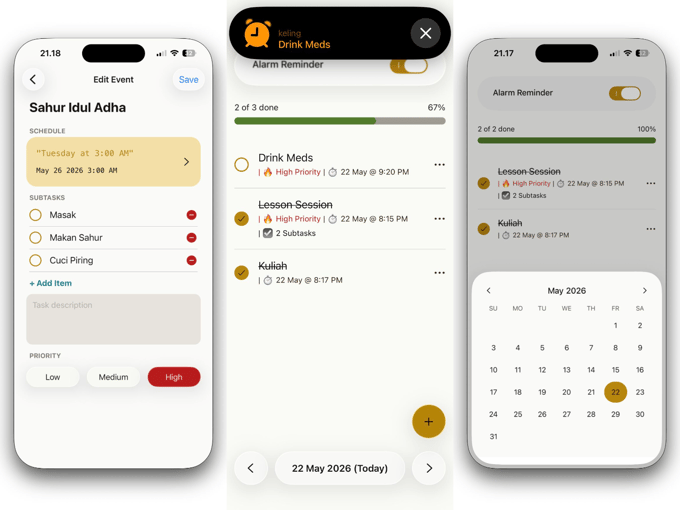
Keling (from the Javanese word “Kelingan,” meaning “to remember”) is my personal one-stop shop for remembering things. It’s a fine-grained Reminder, Alarm, and Checklist app with one goal: make sure I never forget anything, on my terms.
Two Scheduling Modes
Keling supports two distinct scheduling approaches:
1. One-Shot Alarms
Trigger once on a specific date at a specific time. Useful for appointments, deadlines, or any event that happens exactly once.
2. Recurring Alarms via CRON
For repeating tasks, Keling uses the tried-and-true CRON scheduling system. This gives you far more flexibility than iOS’s day-of-week picker. Want an alarm every third Thursday? Every weekday at 8 AM but not on holidays? CRON expressions make it trivial.
Building with AlarmKit
The secret sauce is Apple’s brand-new AlarmKit API, available exclusively on iOS 26. This API allows third-party apps to trigger a true alarm-like experience, the kind where your phone rings persistently until you interact, just like the built-in Clock app.
Previously, the best you could do was a local notification. Those are easy to dismiss and easy to miss. AlarmKit changes the game entirely.
Liquid Glass on React Native
Oh, did I mention? Keling also uses the state-of-the-art Liquid Glass support for React Native. This gives the app the translucent, depth-aware aesthetic that Apple’s been pushing as the next evolution of its design language.
Getting Liquid Glass working in React Native wasn’t trivial, the API surface is still changing and documentation is minimal or nonexistent. But the result? not only it works very well, it looks like a first-party Apple experience.
The Bigger Lesson
This project highlight something I’ve been thinking about lately: the gap that separeates idea and execution has never been smaller.
Between AI-assisted coding, platforms like React Native for cross-platform development, and APIs like AlarmKit that unlock previously closed-off system capabilities, a single developer can ship something that would have required a dedicated team just a few years ago. It has never been easier to test your idea to reality.
Keling isn’t on the App Store yet, but it’s coming soon!
If there’s one thing I’d leave you with: the next time you’re frustrated with a piece of software, ask yourself: can I just build a better one? even if it’s just better for yourself
The answer is probably yes.