Using SQLC for ORM Alternative in Golang, ft. Go-Migrate & PGX
This blogpost also posted in Medium as a part of Gravel Engineering blog.
Why SQLC?
For those who does not know what SQLC is, it is a Database tools to generate idiomatic type-safe go code that derived from our own SQL Queries.
Why using SQLC you may asked? because ORM only great if you have rather basic relationships between models OR you basically omit any modern relational DB feature for ease of use. Once you have the needs to modify models in the non-basic ways, you’re start to tangle the ORM code and may or may not impact performance due to unoptimized queries.
SQLC is here for people that comfortable using SQL Queries but want the type safety of Go, basically dealing with the uncomfortable part of actually using Database in any programming language, but still allowing us to make deep, optimized modification as any people with SQL know-how can relate.
Setting up SQLC
SQLC comes in various flavour, you can embed it directly via brew:
brew install sqlcOr via Go Instal (Go >=1.17):
go install github.com/kyleconroy/sqlc/cmd/sqlc@latestOr via Go Get:
go get github.com/kyleconroy/sqlc/cmd/sqlcIt also has docker image for those that needed it in a pipeline somehow:
docker pull kjconroy/sqlcAfter you install SQLC in any way, you should then afterward has access to it in terminal via sqlc command.
Using SQLC in Go Project
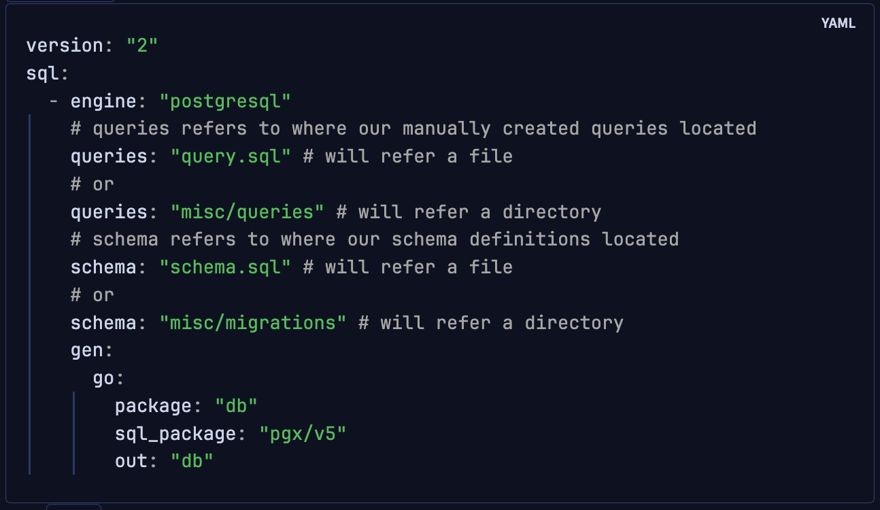
After you Initiate a Golang project, you can start using SQLC by first creating it’s configuration file in sqlc.yaml:
version: "2"
sql:
  - engine: "postgresql"
    # queries refers to where our manually created queries located
    queries: "query.sql" # will refer a file
    # or
    queries: "misc/queries" # will refer a directory
    # schema refers to where our schema definitions located
    schema: "schema.sql" # will refer a file
    # or
    schema: "misc/migrations" # will refer a directory
    gen:
      go:
        package: "db"
        sql_package: "pgx/v5"
        out: "db"
This YAML specifies several things:
- Engine -> What kind of DB you’re using. In this example we’re using
postgresql - Queries-> File/Directory for where you store your SQL Queries. These queries is the source target for
SQLCto generate type-safe Go code. - Schema -> FIle/Directory for where you store your schema logic.
SQLChas support forgo-migrateschema structure ofup.sqlanddown.sqlformat. Else, you may want to just dump the schema in a singleschema.sqlfile. - Gen -> specify the auto-generated parts of the
SQLC, in this example it will generateGospecific implementation:- Package -> specify the
packagename of the generated code. - Out -> specify the
pathwhere the generated code will be put on. - SQL_Package -> due to
go/pqpackage is currently entering maintenance mode, we’re encouraged to usepgxdriver instead. This will specify thepgxversion thatSQLCwill be basing on.
- Package -> specify the
Using SQLC to generate Type-Safe Models from schema
In this example, I will demonstrate how to use go-migrate as the companion tools. After setting up Go-Migrate, we can create new migration via:
migrate create -ext sql -dir misc/migrations CreateAuthorIt will create xxxxxxx_CreateAuthor.up.sql and xxxxxxx_CreateAuthor.down.sql in misc/migrations (Remember that this is the path of schema in the sqlc.yaml).
There we can define the migration up and the migration down of our codes. Then I will create a schema for authors table:
CREATE TABLE authors (
	id BIGSERIAL PRIMARY KEY,
	name text NOT NULL,
	bio text
);
CREATE INDEX IF NOT EXISTS "idx_authors_id" ON "authors" ("id");
This will do 2 things:
- tell
go-migratewhat migration needed to be executed - tell
sqlcwhat is the schema for tableauthors
Then after that, we can migrate our DB so our author table would be created. Migrate the authors table via :
migrate -database <Put your DSN here> -path=misc/migrations up allAfter that we can generate the model for authors via:
sqlc generateIt will then create a new file called db/models.go that contains:
package db
import (
	"github.com/jackc/pgx/v5/pgtype"
	typeext "github.com/muhwyndhamhp/material-go/utils/typeext"
)

type Author struct {
	ID int64
	Name string
	Bio pgtype.Text
}
Using SQLC to generate Type-Safe Functions that execute DB Transactions
Now that we have the model, we also want to create various transactions. SQLC doesn’t generate transaction for us, instead, we’re supposed to create our own transaction.
First we should create new file called authors.sql inside misc/queries (Remember this is the queries path we define in the sqlc.yaml up above):
-- name: GetAuthor :one
SELECT * FROM authors
WHERE id = $1 LIMIT 1;

-- name: ListAuthors :many
SELECT * FROM authors
ORDER BY name;

-- name: CreateAuthor :one
INSERT INTO authors (name, bio)
VALUES ( $1, $2)
RETURNING *;

-- name: DeleteAuthor :exec
DELETE FROM authors
WHERE id = $1;

-- name: UpdateAuthor :one
UPDATE authors
SET name = $2, bio = $3
WHERE id = $1 RETURNING *;
Here, we’re defining several queries that refers to various operations. sqlc will read the comment structure above the queries to define what the function is and what kind of return format it wants.
-- name: CreateAuthor :one
INSERT ...
This comments means:
- Name of the function is
CreateAuthor - It should return exactly 1 schema of
authors.
Other than :one, it also support :many for returning more than 1 schema in a list, and :exec which means it won’t return any schema (only executing the SQL).
After that we can exec:
sqlc generateagain to both generate the model and the function. It will then create file db/authors.sql.go:
package db

import (
	"context"
	"github.com/jackc/pgx/v5/pgtype"
)

const createAuthor = `-- name: CreateAuthor :one
INSERT INTO authors (name, bio)
VALUES ($1, $2)
RETURNING id, name, bio
`

type CreateAuthorParams struct {
	Name string
	Bio pgtype.Text
}

func (q *Queries) CreateAuthor(ctx context.Context, arg CreateAuthorParams) (Author, error) {
	row := q.db.QueryRow(ctx, createAuthor, arg.Name, arg.Bio)
	var i Author
	err := row.Scan(&i.ID, &i.Name, &i.Bio)
	return i, err
}

// And many more below as you define your queries...
Using SQLC generated function in a program
One more thing that I haven’t mentioned is that other than generating models.go and authors.go inside db path (or any path that you specify in sqlc.yaml), it will also generate db.go file which functions as the entry points for our queries.
Before you can call queries tho, we need to do two things:
1. Create new DB instance
You can put this anywhere you first time initiate your program. Or if you have some sort of dependency injection, anywhere you initiate your DB instance:
func GetDB() (*pgx.db,error) {
   db, err := pgxpool.New(ctx, `user=postgres dbname=postgres_db sslmode=disable host=localhost port=5678`)

   if err != nil {
	   return nil, err
   }
   return db, nil
}
2. Initiate Query entry point
After that, we should use the db instance up above to initiate entry points for our queries:
queries := db.New(db)3. Use our Query!
Then you can immediately use queries to access our predefined queries above. For example:
func insert() error {
   insertedAuthor, err := queries.CreateAuthor(ctx, db.CreateAuthorParams{
	   Name: "Brian Kernighan",
	   Bio: pgtype.Text{
		   String: "Co-author of The C Programming Language",
		   Valid: true,
	   },
   })

   if err != nil {
	   return err
   }

   log.Println(insertedAuthor)
   return nil
}
That’s it! 🎉
Further Notes
This conclude the basic setups for SQLC in a Go project. But I suppose there is more than that to a project. Further readings can be found below:
- Using custom struct for JSONB Type in SQLC (Work in Progress)